
Digital twins · TwinPro by Firstgreen
Intelligent assets. Stronger futures.
Connect the physical asset to its digital context. A digital twin brings equipment identity, system relationships and operating data together to support better decisions throughout an asset’s life.
Introducing TwinPro
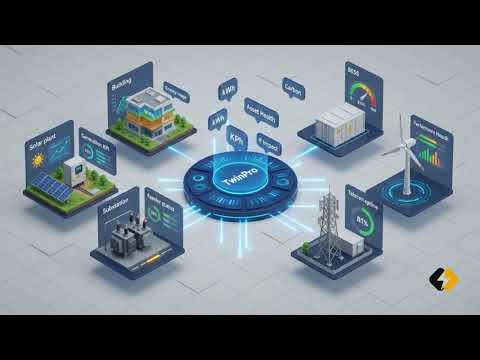
TwinPro is Firstgreen’s digital twin platform for smarter asset operations, bringing monitoring, diagnostics and intelligence into a connected view of your assets. Explore how site data and asset context can help teams understand performance, investigate issues and plan operational action.
TwinPro for Solar is live now. Wind and Buildings are planned sector offerings. Available capabilities and measurements depend on each deployment and its site data.
TwinPro across sectors
TwinPro for Solar
Live now
Explore plant and equipment navigation, asset-linked measurements and performance diagnostics. Discuss forecasting and maintenance workflows relevant to your solar portfolio.
TwinPro for Wind
Planned offering
A sector focus for connecting turbine and wind-farm context with operational data. Speak with our team about your monitoring, diagnostics and maintenance requirements.
TwinPro for Buildings
Planned offering
A sector focus for building systems, energy use and equipment performance. Discuss how a digital twin could support your facilities and sustainability priorities.
Other assets and infrastructure: Have a different use case? Contact Firstgreen to explore the asset information, data connections and workflows your project would need.
Watch the TwinPro introduction
Watch the TwinPro introduction to explore the platform and its approach to smarter asset operations.
▶Download the TwinPro presentation
Explore the TwinPro vision and platform overview in our introductory presentation.
Presentation dated 6 October 2026 · 12 pages · PDF. The presentation describes the broader TwinPro vision; TwinPro for Solar is the currently live offering.
Share this presentation page →
Start with your assets and your priorities.
Share your portfolio, current monitoring arrangements and operational priorities. Our team can demonstrate the relevant solar workflows and discuss the data connections, asset information and implementation steps for your site.
Explore the thinking behind TwinPro.
Read Firstgreen’s latest perspectives on solar digital twins, asset-linked data and operational decision-making.
TwinPro for Solar · Digital twin walkthrough
From plant data to a clearer next action.
See how TwinPro brings solar asset context and operating information into one connected view, helping teams investigate performance and plan follow-up.
Interactive product walkthrough
Explore the TwinPro digital twin
Open the TwinPro product walkthrough to explore its solar plant model, asset hierarchy, spatial and electrical relationships, and telemetry mapped to physical assets. The module also outlines how engineering drawings and asset records are connected to operational data.
View the Digital Twin module ↗On the TwinPro site
- 2D and 3D plant visualisation
- Portfolio-to-component asset navigation
- Spatial, electrical and telemetry context
- A four-step import, structure, connect and operate walkthrough
The product page provides the detailed visual walkthrough; capabilities and measurements vary by deployment and available site data.
A practical solar workflow
Four steps from asset context to action
01 · Build the context
Map the plant
Connect the site layout, equipment hierarchy and electrical relationships so teams can navigate from plant to asset.
02 · Connect available data
Bring performance into view
Review available monitoring and SCADA information alongside asset context. The exact measurements depend on the site and its data connections.
03 · Investigate
Understand the signal
Use monitoring and diagnostic views to examine performance changes, locate the relevant equipment and focus follow-up.
04 · Plan the response
Coordinate next actions
Discuss how operational workflows, inspection evidence and portfolio views can support your team’s way of working.
Useful starting information
You do not need to prepare a perfect data pack to start the conversation. These items help us assess the use case and available connections:
- Plant layout or site drawings
- Asset list and equipment hierarchy
- Electrical single-line diagrams or connection details
- Monitoring or SCADA sources and sample measurements
- Current inspection, maintenance or performance-review process
Data formats, access and integration scope are reviewed with you; availability varies by site.
How deployment is scoped
- Agree the plant, teams and decisions to support.
- Review asset records, drawings and current data sources.
- Map the asset structure and confirm feasible connections.
- Configure the relevant views and operational workflows.
- Validate the information with your team and plan the rollout.
These are scoping steps; final scope, timing and capabilities are confirmed for each deployment.
What a demo can cover
Bring one plant or one operational question.
A tailored walkthrough can explore plant and equipment navigation, available performance measurements, diagnostic views and relevant operational workflows. We’ll use your priorities to discuss the data needed, how the use case could be scoped, and what should be validated before rollout.
Book a TwinPro platform demo ↗TwinPro for Solar is the current live offering. Wind and Buildings remain planned offerings. Platform capabilities and measurements depend on the deployment and its available data.
